
Yahoo Mail
Screenshots



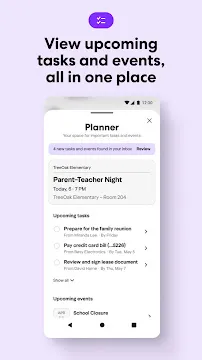

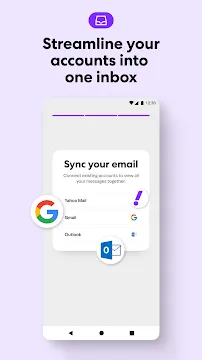


Yahoo Mail provides a streamlined and highly organized experience for anyone who wants to manage their electronic correspondence on a mobile device. While many email services feel cluttered, this application focuses on clarity and speed. It allows you to consolidate multiple accounts into one place, making it a central point for all your messages. You can link services like Gmail, Outlook, and AOL to see everything in a single inbox. The design prioritizes user comfort with large buttons and intuitive gestures. Because it offers a massive amount of free storage, you rarely have to worry about deleting old messages to save space. The software functions smoothly, ensuring that you receive notifications the moment a new message arrives. By using this tool, you gain a reliable way to stay connected with colleagues, friends, and family without the typical stress of a messy inbox.
Mastering Inbox Organization with Yahoo Mail
Keeping your digital life tidy is easier when you use the built-in organization tools. The application automatically categorizes your messages into specific tabs like “Deals,” “Travel,” and “Subscriptions.” This means your important personal notes do not get buried under marketing flyers. You can quickly scan through your “Deals” folder to find coupons without scrolling through your entire primary inbox.
The interface also features a “One-tap Unsubscribe” button for newsletters. If you find your inbox is too full of unwanted content, you can remove yourself from mailing lists with a single click. Furthermore, the app allows you to customize the swipe gestures. You can set a left swipe to delete and a right swipe to archive, or vice versa. This level of customization ensures that the software works exactly how you prefer.
Why Speed and Storage Define Yahoo Mail
Performance remains a critical factor for mobile users who need to check messages on the go. This application loads quickly and handles large attachments without slowing down your device. Because the developers optimized the code for mobile performance, it remains responsive even with thousands of unread messages.
- Massive Storage: Enjoy 1TB of free space, which is significantly more than most competitors offer.
- Fast Searching: Find specific messages, photos, or documents in seconds using the advanced search bar.
- Reliable Notifications: Get instant alerts so you never miss a time-sensitive update.
This combination of speed and space makes the app a favorite for professionals and casual users alike. You can save years of memories and business documents without hitting a storage limit. The search feature is particularly powerful, as it allows you to filter results by sender, date, or keyword to find exactly what you need.
Security Features for a Safe Yahoo Mail Experience
Protecting your personal data is a top priority for the developers. The application includes several layers of security to keep your account safe from unauthorized access. You can enable two-step verification, which requires a second code from your phone whenever someone tries to log in. This prevents hackers from gaining access even if they manage to find your password.
The software also filters out spam and phishing attempts automatically. It identifies suspicious links and warns you before you click on them. For added privacy, you can use “Account Key” to log in without a password. This system sends a secure notification to your mobile device, allowing you to approve the login with a simple tap. These modern security measures provide peace of mind while you manage your sensitive information.
Customizing the Look of Your Yahoo Mail
Personalization helps make your inbox feel more like your own space. You can choose from various themes and colors to change the look of the interface. If you prefer a darker look, you can enable “Dark Mode” to reduce eye strain during late-night sessions. This also helps save battery life on phones with certain screen types.
Beyond colors, you can adjust the layout to show more or less information at once. Some people prefer a dense view to see more messages, while others like a spacious layout for better readability. You can also change the sound of your notifications for different folders. This way, you know if a message is a high-priority work email or just a simple social update without even looking at your screen.
Managing Attachments and Documents Effortlessly
Finding a specific file in a long thread of messages can be difficult. This application simplifies the process by offering a dedicated “Attachments” view. This section pulls all the photos and documents from your inbox into one easy-to-navigate gallery. You can see your flight tickets, receipts, and family photos without opening individual messages.
The app supports various file types, including PDFs, Word documents, and high-resolution images. You can preview these files directly within the interface before downloading or sharing them. If you need to send a large file, you can link your cloud storage services like Google Drive or Dropbox. This integration ensures that you can share important data quickly and efficiently from your phone.
The Future of Mobile Communication and Yahoo Mail
The development team continues to release regular updates to improve the user experience. They listen to community feedback to add new features that simplify daily tasks. Future updates likely include even more advanced AI tools to help you draft replies and organize your schedule.
As mobile technology advances, the app stays current by supporting the latest operating system features. It integrates seamlessly with your phone’s calendar and contacts to provide a unified communication system. By choosing a service with a long history of reliability, you ensure that your email remains accessible and secure for years to come. This commitment to growth and stability makes the platform a solid choice for anyone looking to optimize their mobile correspondence.
Conclusion
Yahoo Mail offers a comprehensive and user-friendly solution for managing your digital communication. It combines massive storage with powerful organization tools to keep your inbox clean and accessible. The focus on security and speed ensures that your data stays protected while you stay productive. With its customizable interface and excellent attachment management, it adapts to your unique needs. Whether you are looking to unsubscribe from clutter or find an old document, this application provides the tools to get it done. It represents a reliable partner for your mobile lifestyle, helping you stay organized and connected every day. Download the app today to see how a well-designed email service can simplify your life.